Overview
CSS selectors are patterns used to select and style HTML elements. They are the foundation of CSS, enabling you to target specific elements, groups of elements, or elements in particular states or positions within the document structure. Understanding selectors allows you to write efficient, maintainable stylesheets that apply styles precisely where needed without unnecessary repetition or overly specific rules.
Selectors range from simple element type selectors to complex combinations involving pseudo-classes, pseudo-elements, and attribute selectors. Each selector type has different specificity, which determines which styles apply when multiple rules target the same element. Mastering selectors and specificity is essential for writing CSS that behaves predictably and is easy to maintain as projects grow.
When to Use It
Use CSS selectors whenever you need to apply styles to HTML elements. Choose simple selectors like element types or classes for broad styling patterns. Use more specific selectors when you need to target elements in particular contexts, such as navigation links versus content links. Employ pseudo-classes for interactive states like hover or focus. Use attribute selectors when styling based on element attributes like input types or data attributes.
Understanding when to use each selector type helps you write maintainable CSS. Prefer classes for reusable components, IDs for unique page elements that need JavaScript hooks, and combinators for contextual styling. Avoid overly specific selectors that make styles difficult to override or reuse. Choose selectors that express your intent clearly while maintaining appropriate specificity for the styling hierarchy you need.
How It Works
CSS selectors work by matching patterns against elements in the HTML document. The browser parses your CSS rules and applies styles to elements that match the selector patterns. Selectors are evaluated from right to left for performance, so the rightmost selector (the key selector) is checked first. Understanding this helps you write more efficient selectors by making key selectors as specific as possible.
Specificity determines which styles apply when multiple rules match the same element. Specificity is calculated based on selector components: inline styles have highest specificity, followed by IDs, classes and attributes, then element types. When specificity is equal, the last rule in the stylesheet wins. The important flag overrides specificity but should be used sparingly as it makes debugging and maintenance difficult.
Selector Types
Basic Selectors
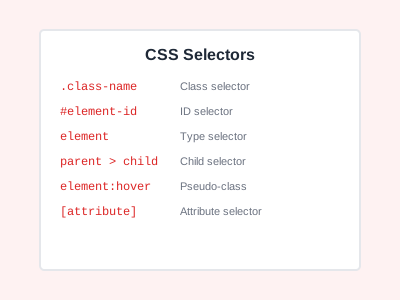
Element selectors match all elements of a specific type. Class selectors match elements with a specific class attribute. ID selectors match the single element with a specific ID. The universal selector matches all elements. Attribute selectors match elements based on attribute presence or values.
/* Element selector */
p { color: #1f2937; }

/* Class selector */
.button { padding: 10px 20px; }

/* ID selector */
#header { background: #f9fafb; }

/* Universal selector */
* { box-sizing: border-box; }

/* Attribute selector */
input[type="text"] { border: 1px solid #e5e7eb; }
Combinators
Descendant combinator selects elements that are descendants of a specified element. Child combinator selects direct children only. Adjacent sibling combinator selects the immediately following sibling. General sibling combinator selects all following siblings.
/* Descendant combinator */
.container p { margin-bottom: 1rem; }

/* Child combinator */
ul > li { list-style-type: none; }

/* Adjacent sibling */
h2 + p { margin-top: 0; }

/* General sibling */
h2 ~ p { color: #6b7280; }
Pseudo-Classes
Pseudo-classes select elements based on state or position. Common examples include hover for mouse-over state, focus for focused form elements, first-child for the first child element, nth-child for positional selection, and not for negation.
/* Interactive states */
a:hover { color: #1f2937; }
input:focus { outline: 2px solid #4b5563; }

/* Positional */
li:first-child { margin-top: 0; }
tr:nth-child(even) { background: #f9fafb; }

/* Negation */
button:not(.primary) { background: #e5e7eb; }
Pseudo-Elements
Pseudo-elements create virtual elements for styling specific parts of elements. The before and after pseudo-elements insert content before or after element content. The first-line and first-letter pseudo-elements style the first line or letter of text.
/* Generated content */
.icon::before {
    content: "→";
    margin-right: 0.5rem;
}

/* Text styling */
p::first-letter {
    font-size: 2em;
    font-weight: bold;
}
Example Usage
Styling a Navigation Menu
.nav {
    display: flex;
    gap: 1rem;
}

.nav a {
    color: #4b5563;
    text-decoration: none;
}

.nav a:hover {
    color: #1f2937;
}

.nav a.active {
    font-weight: bold;
    color: #1f2937;
}
Form Input Styling
input[type="text"],
input[type="email"],
textarea {
    padding: 0.5rem;
    border: 1px solid #d1d5db;
    border-radius: 4px;
}

input:focus {
    outline: none;
    border-color: #4b5563;
}

input:invalid {
    border-color: #ef4444;
}
Common Pitfalls
Overusing ID Selectors
ID selectors have very high specificity, making styles difficult to override. Prefer classes for styling, reserving IDs for JavaScript hooks or unique page anchors.
Creating Overly Specific Selectors
Long selector chains like .header .nav ul li a create brittle CSS that breaks when HTML structure changes. Keep selectors as simple as possible while maintaining necessary specificity.
Not Understanding Specificity
Specificity confusion leads to unexpected styling results and overuse of important. Learn specificity rules and use them intentionally to create maintainable CSS hierarchies.
Ignoring Selector Performance
While modern browsers are fast, inefficient selectors can impact performance on complex pages. Avoid universal selectors in key positions and minimize use of complex attribute selectors in performance-critical contexts.
Best Practices
Use Classes for Reusable Styles
Classes provide the right balance of reusability and specificity. Create semantic class names that describe purpose rather than appearance for better maintainability.
Keep Specificity Low
Write selectors with the minimum specificity needed. This makes styles easier to override when necessary and reduces the need for important declarations.
Leverage Combinators Wisely
Use child and sibling combinators to create contextual styles without increasing specificity unnecessarily. This creates flexible, maintainable stylesheets.
Use Meaningful Attribute Selectors
Attribute selectors are powerful for styling form inputs, links, and elements with data attributes. Use them to create dynamic styles that respond to element state or content.
Conclusion
CSS selectors are the foundation of effective styling. Understanding selector types, combinators, pseudo-classes, and specificity enables you to write maintainable, efficient stylesheets. Choose appropriate selectors for each use case, keep specificity manageable, and follow best practices to create CSS that scales with your project. Mastering selectors improves both development speed and code quality.